peiqili / Steam-Free-License-Cleaner-Bulk-Remove-Free-Steam-Licenses
Steam Free License Cleaner
Bulk remove unwanted free Steam licenses with selective filtering.
Clean up your Steam library by removing unwanted free games, DLCs, soundtracks, tools, demos, and trial licenses.
Greasy Fork · GitHub Repository
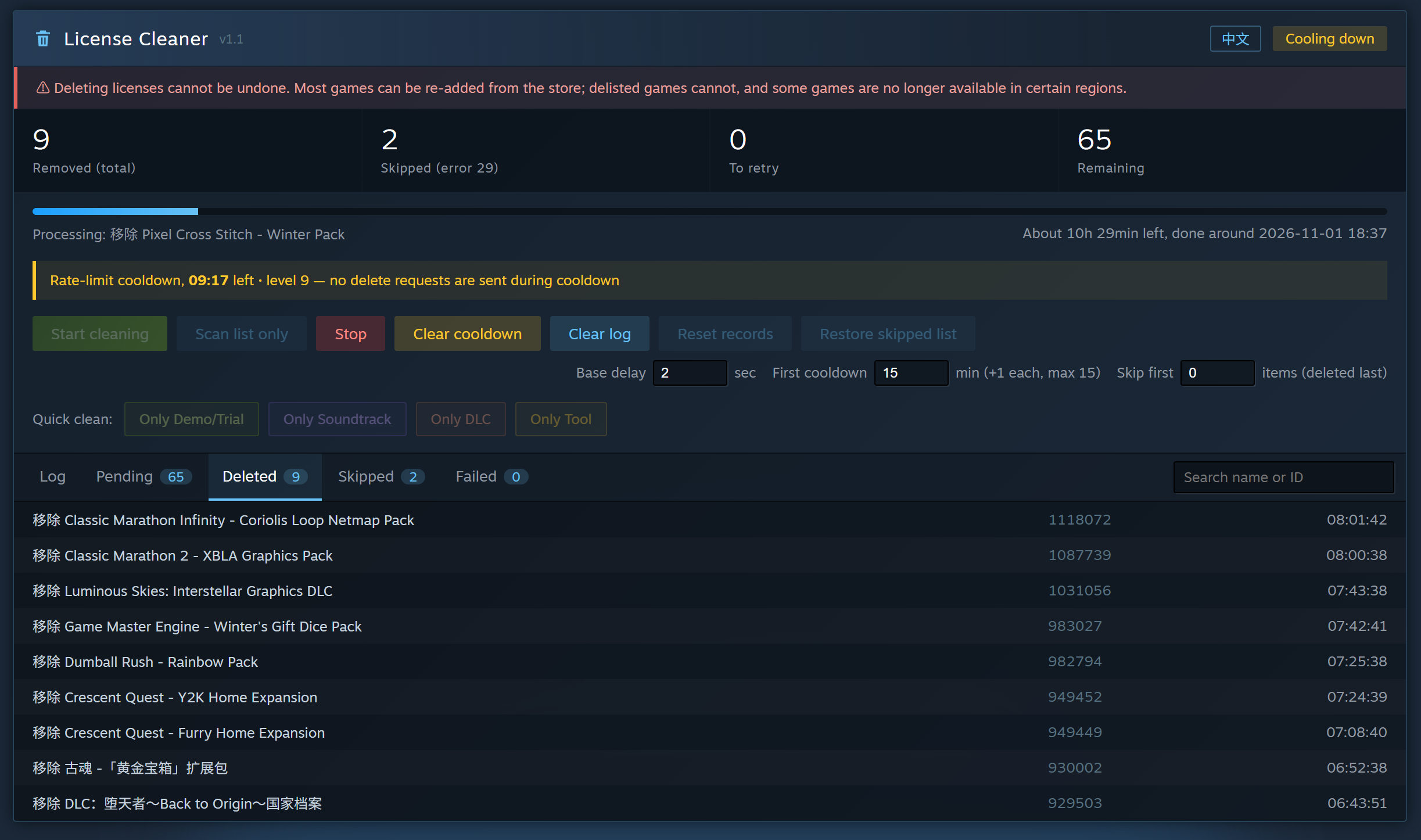
Screenshot
Language / 语言
English
Overview
Steam Free License Cleaner is a userscript designed to help you clean up unwanted free licenses from your Steam account.
It allows you to scan your Steam license list, filter items by category, and selectively remove unwanted licenses in bulk.
Whether you want to clean up old demos, remove unwanted soundtracks, or organize your Steam library, this script gives you more control over your licenses.
Features
- Bulk License Removal: Remove multiple unwanted free licenses.
- Selective Category Filtering: Choose which types of licenses to clean.
- Quick Clean Buttons: Quickly select Demo/Trial, Soundtrack, DLC, or Tool licenses.
- Scan Before Cleaning: Preview your licenses before starting the removal process.
- Multilingual Detection: Recognize category keywords in multiple languages.
- Operation Tracking: Track deleted, skipped, pending, and failed items.
- Rate-limit Protection: Includes safeguards to reduce the risk of sending requests too quickly.
Supported Categories
| Category | Description |
|---|---|
| Game | Free game licenses |
| DLC | Downloadable content and expansions |
| Soundtrack | Game soundtracks and music |
| Tool | Tools, SDKs, workshop tools, and servers |
| Demo / Trial | Demos, trials, betas, playtests, and previews |
How Categorization Works
The script identifies license categories by matching keywords in license names.
Examples:
| Category | Example Keywords |
|---|---|
| Soundtrack | Soundtrack, OST, Music |
| DLC | DLC, Expansion, Pack |
| Demo / Trial | Demo, Trial, Beta, Playtest, Preview, Prologue |
| Tool | Tool, SDK, Workshop, Server |
Items that do not match the other category keywords are classified as Game.
Note: Categorization relies on name-based keyword matching rather than official Steam app-type metadata. Some items may be incorrectly classified or remain undetected.
Quick Start
1. Install a Userscript Manager
Install one of the following browser extensions:
2. Install the Script
Recommended: Install directly from Greasy Fork.
Install Steam Free License Cleaner
Hint: Successful installation does not necessarily mean the script is running. In Tampermonkey, make sure the extension is enabled, the script itself is enabled, and the extension is allowed to run on Steam.
You can also browse the source code and project updates on GitHub:
3. Open Your Steam Licenses Page
Log in to Steam and visit:
https://store.steampowered.com/account/licenses/
4. Scan Your Licenses
Click Scan List Only to scan and preview your licenses.
Review the results and select the items you want to remove.
5. Start Cleaning
Click Start Cleaning to begin removing the selected licenses.
Quick Clean Buttons
The script provides shortcuts for common cleanup tasks:
| Button | Function |
|---|---|
| Only Demo/Trial | Select Demo and Trial licenses |
| Only Soundtrack | Select Soundtrack licenses |
| Only DLC | Select DLC licenses |
| Only Tool | Select Tool licenses |
These shortcuts scan the license list, select the corresponding category, and ask for confirmation before removal.
Safety & Important Notes
- Review before deleting. Use Scan List Only to preview your licenses.
- Deletion may be permanent. Removed licenses may not be recoverable through this script.
- Some licenses cannot be removed. Steam may reject certain removal requests.
- Avoid repeated requests. Steam may impose rate limits if requests are sent too quickly.
- Keep your account secure. Never share your Steam password, session cookies, or authentication information.
Use this script carefully and review your selections before confirming deletion.
Error Codes & Troubleshooting
| Error Code | Possible Cause | Suggested Action |
|---|---|---|
| 84 | Steam rate limit | Wait for the cooldown period. Avoid opening multiple cleaning tabs or reducing request intervals. |
| 29 | License may be unavailable for removal | The item may be skipped. Check it manually if necessary. |
| 24 | Steam login session expired | Stop the current operation, refresh the page, log in again, and restart. |
| HTTP 429 | Too many requests | Wait before trying again. |
| Other / Unknown | Temporary network or server error | The script may retry failed items, with a limited number of attempts. |
Note: Error explanations are based on observed behavior and may vary depending on Steam's response.
FAQ
Q: Does this script remove paid games?
The script is designed to clean up unwanted free licenses. Review the selected items carefully before confirming removal.
Q: Can I remove only DLCs?
Yes. Use the Only DLC shortcut or select DLC items manually.
Q: Can I preview items before deleting them?
Yes. Click Scan List Only to preview your licenses without starting the removal process.
Q: Can removed licenses be restored?
The script cannot restore removed licenses. Treat every deletion as potentially permanent.
Q: Why are some items skipped?
Some licenses may not be removable through Steam's available license-removal mechanism.
Disclaimer
This project is an independent community tool and is not affiliated with, endorsed by, or sponsored by Valve Corporation or Steam.
Use it at your own risk.
简体中文
项目简介
Steam Free License Cleaner 是一个用于清理 Steam 账户中不需要的免费许可的用户脚本。
它可以扫描 Steam 账户的许可列表,按照内容类别筛选项目,并批量移除选中的许可。
无论你想清理旧的试玩版、移除不需要的原声音乐,还是整理 Steam 账户中的免费内容,都可以通过这个脚本更灵活地管理自己的许可。
功能特点
- 批量移除许可:一次性清理多个不需要的免费许可。
- 分类筛选:根据内容类别选择需要清理的项目。
- 快捷清理按钮:快速选择试玩版、原声音乐、DLC 或工具。
- 清理前预览:先扫描许可列表,确认选择后再执行。
- 多语言识别:通过多语言关键词识别许可类别。
- 操作记录:记录已删除、已跳过、待处理和失败的项目。
- 频率限制保护:包含请求频率控制机制,降低触发 Steam 限流的风险。
支持的分类
| 分类 | 说明 |
|---|---|
| Game(游戏) | 免费游戏许可 |
| DLC | 游戏扩展内容及附加内容 |
| Soundtrack(原声音乐) | 游戏原声、音乐 |
| Tool(工具) | 工具、SDK、创意工坊工具、服务器等 |
| Demo / Trial(试玩) | Demo、Trial、Beta、Playtest、Preview 等 |
分类识别机制
脚本通过匹配 Steam 许可名称中的关键词来判断项目类别。
例如:
| 分类 | 关键词示例 |
|---|---|
| Soundtrack | Soundtrack、OST、Music |
| DLC | DLC、Expansion、Pack |
| Demo / Trial | Demo、Trial、Beta、Playtest、Preview、Prologue |
| Tool | Tool、SDK、Workshop、Server |
未匹配到其他分类关键词的项目会被归入 Game(游戏)。
注意: 分类依据是许可名称中的关键词,并非 Steam 官方提供的应用类型数据。因此,可能出现分类错误或无法识别的情况。
快速开始
1. 安装用户脚本管理器
推荐安装以下浏览器扩展之一:
2. 安装脚本
推荐方式: 通过 Greasy Fork 页面安装。
提示: 脚本安装成功不代表已经正常运行。请确认 Tampermonkey 扩展已启用、脚本本身已启用,并且允许该扩展在 Steam 页面运行。
你也可以前往 GitHub 查看源代码和项目更新:
3. 打开 Steam 许可页面
登录 Steam,然后访问:
https://store.steampowered.com/account/licenses/
4. 扫描许可
点击 Scan List Only,扫描并预览账户中的许可。
检查扫描结果,选择需要移除的项目。
5. 开始清理
点击 Start Cleaning,开始移除已选中的许可。
快捷清理按钮
脚本提供以下快捷操作:
| 按钮 | 功能 |
|---|---|
| Only Demo/Trial | 选择试玩版和测试版许可 |
| Only Soundtrack | 选择原声音乐许可 |
| Only DLC | 选择 DLC 许可 |
| Only Tool | 选择工具类许可 |
快捷按钮会扫描许可列表、选择对应分类,并在移除前要求确认。
安全须知
- 删除前请检查。 使用 Scan List Only 预览许可列表。
- 删除操作可能无法撤销。 脚本无法恢复已经移除的许可。
- 部分许可无法移除。 Steam 可能拒绝某些移除请求。
- 避免频繁请求。 请求过快可能触发 Steam 的频率限制。
- 保护账户安全。 不要分享 Steam 密码、Session Cookie 或其他身份验证信息。
请谨慎使用,并在确认删除前检查所选项目。
错误代码与处理方法
| 错误代码 | 可能原因 | 建议处理方式 |
|---|---|---|
| 84 | 触发 Steam 请求频率限制 | 等待冷却时间。不要同时打开多个清理页面,也不要缩短请求间隔。 |
| 29 | 许可可能无法移除 | 项目可能会被跳过,必要时手动检查。 |
| 24 | Steam 登录会话过期 | 停止当前操作,刷新页面,重新登录后再开始。 |
| HTTP 429 | 请求过于频繁 | 等待一段时间后再尝试。 |
| 其他 / 未知 | 临时网络或服务器错误 | 脚本可能会对失败项目进行有限次数的重试。 |
注意: 错误原因基于实际观察到的行为,具体情况可能因 Steam 返回结果而异。
常见问题
Q:这个脚本会删除付费游戏吗?
脚本主要用于清理不需要的免费许可。确认删除前,请仔细检查已选中的项目。
Q:可以只删除 DLC 吗?
可以。使用 Only DLC 快捷按钮,或者手动选择 DLC 项目。
Q:删除前可以预览吗?
可以。点击 Scan List Only 即可扫描和预览许可,不会直接开始删除。
Q:删除的许可可以恢复吗?
脚本无法恢复已经移除的许可,请将删除操作视为可能无法撤销的操作。
Q:为什么有些项目会被跳过?
部分许可可能无法通过 Steam 提供的许可移除机制进行删除。
免责声明
本项目是独立的社区工具,与 Valve Corporation 或 Steam 没有任何关联,也未获得其认可或赞助。
使用本脚本所产生的风险由使用者自行承担。
Rating: 0