XxUnkn0wnxX / GitHub Fluid Width
github-fluid-width.user.js
Install github-fluid-width.user.js with Tampermonkey or Violentmonkey to control GitHub workspace widths on large desktop screens while preserving GitHub's native rails, split panes, and responsive behavior.
Current documented release: 1.0.3.
Screenshots
Click a preview to open its full-resolution image.
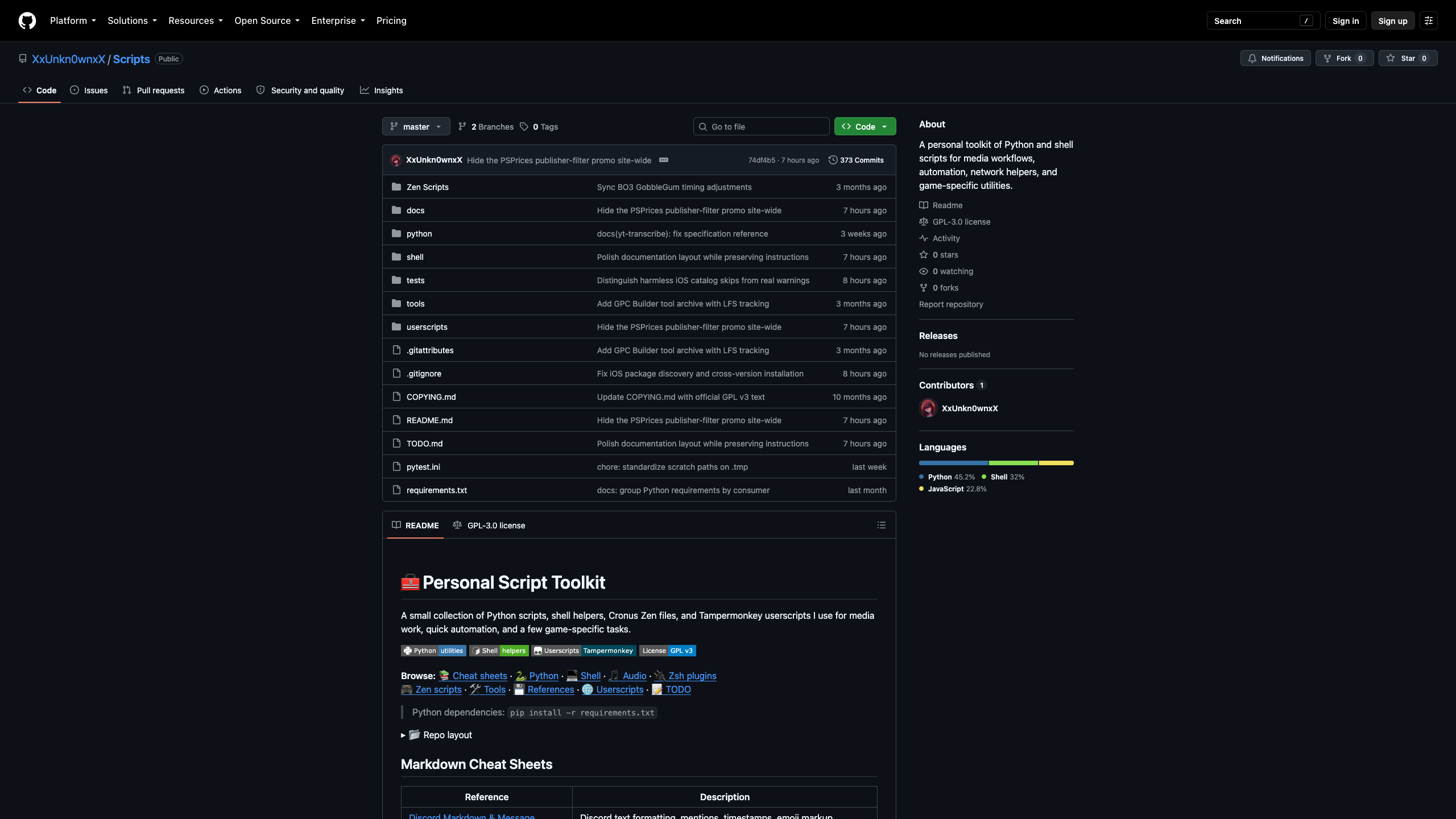
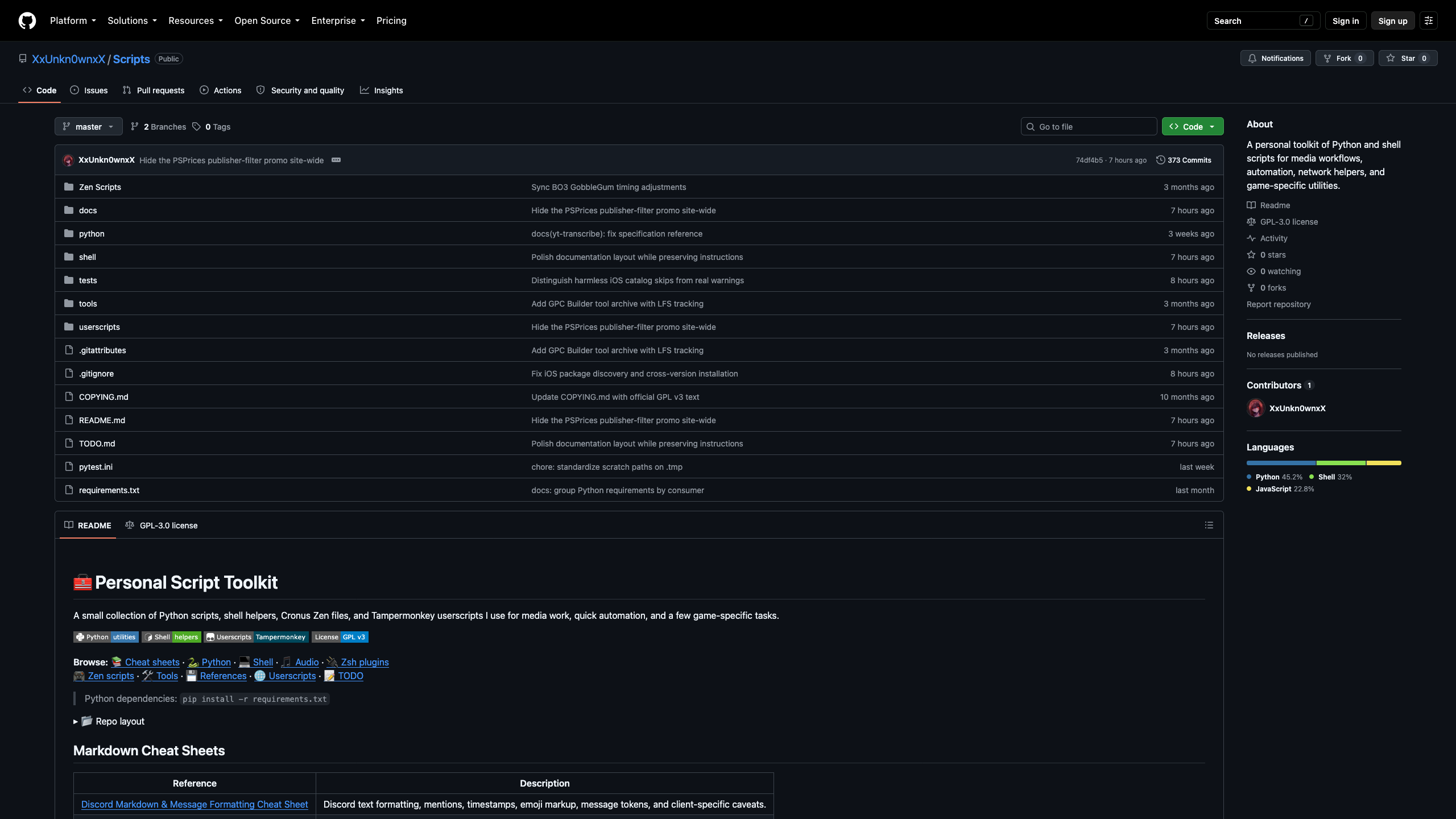
The same public repository at its native width (left) and with the default 95%
fluid width (right). The About sidebar keeps its own width.
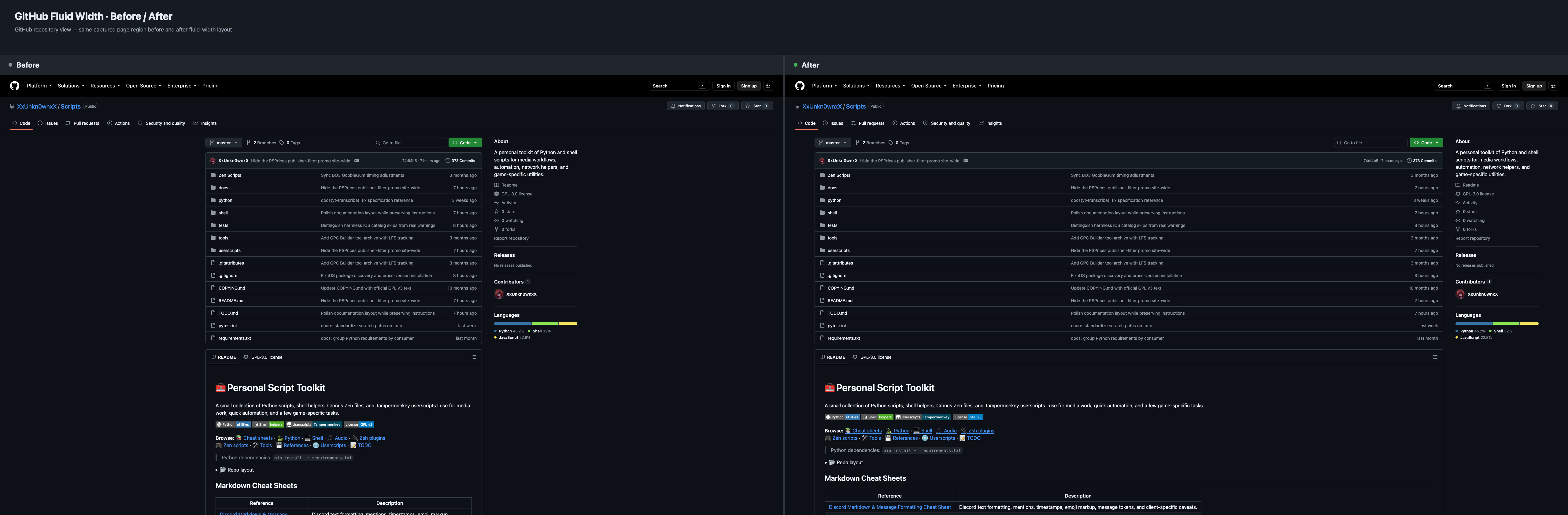
Full-resolution originals: before · after.
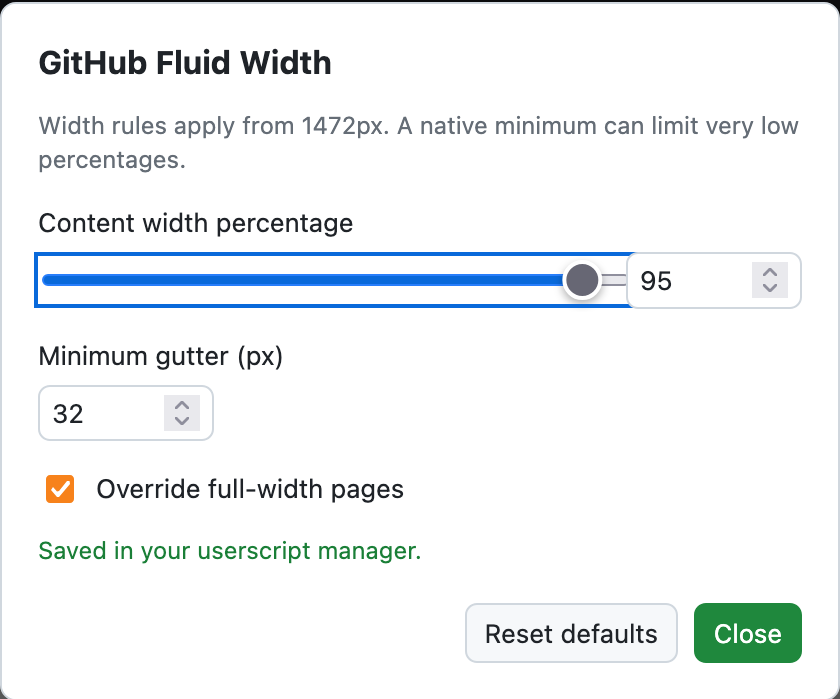
The settings panel in dark appearance:
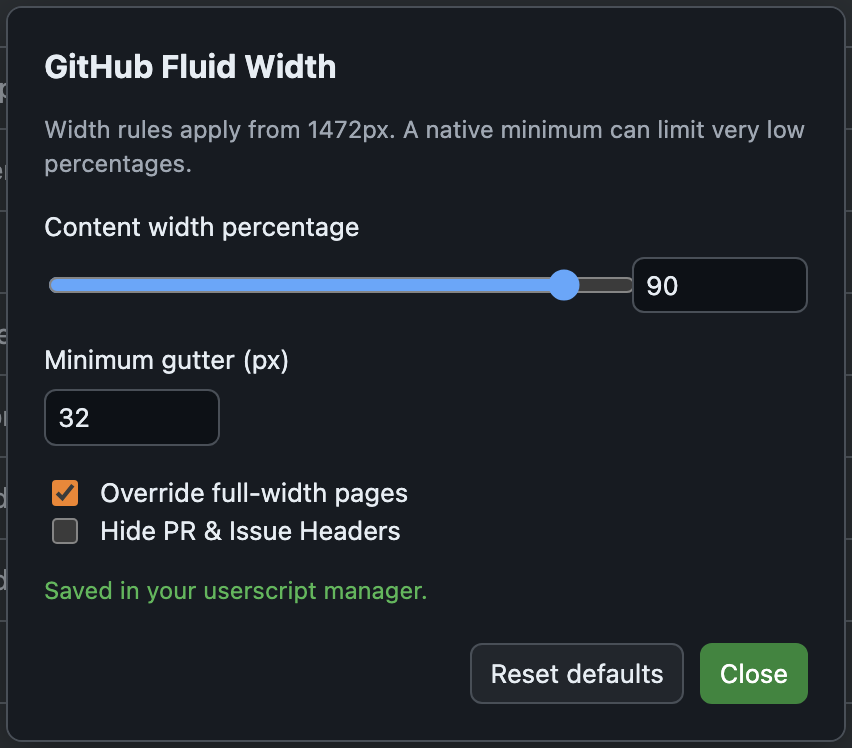
Light appearance: view settings.
What It Does
- activates width overrides only at viewport widths of at least
1472px - widens capped GitHub regions to the configured percentage of their available parent area
- keeps the captured native workspace floor while it fits inside the available parent, and otherwise fills that parent without overflow
- preserves native in-page rails, source trees, Symbols panels, diff/file rails, workflow navigation, and log scrolling; repository-rendered document previews fill their owning panel while retaining native padding and renderer-local behavior; the legacy Discussion thread keeps its captured
320pxmetadata rail while its main column grows, and the dashboard keeps its captured312pxright rail once its wide-shell rule activates - keeps Settings feature-card primary CTAs at the widened row's trailing edge without changing the button's intrinsic size
- leaves GitHub's global navigation drawer as an overlay; opening or closing it does not switch width modes or move the page
- with
overrideFullWidthPages: true(the default), applies the configured target to naturally fullwidth file, folder, source-code, text, rendered-document, pull-request diff, completed Actions, and search workspaces using the same sidebar-aware parent math while preserving local scrolling - with
overrideFullWidthPages: false, leaves those naturally fullwidth workspaces at GitHub's native width while capped-owner expansion and nested rendered-document filling remain active - provides a live settings panel and saves preferences separately from the userscript source, so normal script updates retain existing choices
- optionally hides only GitHub's floating issue and pull-request title headers; regular page headings remain visible
- follows GitHub client-side navigation, back/forward navigation, Turbo/PJAX rendering, and document/head replacement without polling
- makes no network requests, account-state checks, GitHub content restructuring, or GitHub job operations; it maintains its own layout style, ownership markers, settings controls, and manager-stored preferences
The implementation identifies page workspaces from the rendered GitHub
DOM instead of maintaining a positive URL allowlist. Settings, Security,
Pulse, Actions, search, and other page owners are eligible
when their live structure exposes a bounded workspace. Dialogs, drawers,
popovers, menus, rails, comments, and ordinary form controls remain native;
eligible settings or other page sections may contain forms whose controls keep
their intrinsic sizing.
Where It Works
The owner model covers repository overviews and branch roots, PageLayout and
legacy capped sections, pull-request and issue workspaces, Discussions,
Actions, Security, Pulse, Settings, dashboards, profiles, and other rendered
GitHub surfaces when their DOM exposes the same kind of bounded owner. It
widens the outer owner once, then fills only demonstrated nested document
surfaces. Repository README and standalone rendered documents therefore lose
their independent container-lg measure, while source-code panes, diff/file
workspaces, completed logs, and other already-fluid renderers retain native
rendering and local scrolling inside their newly sized workspace. Where an
ancestor wrapper only limits the available track, it is
released before the selected owner is widened. The model does not depend on
branch names or filename extensions.
Global Issues releases its rail-aware wrapper and widens the direct content
workspace while preserving the native sibling pane. Settings feature cards keep
their primary CTA at the trailing edge without changing the button's intrinsic
size.
Desktop and Responsive Behavior
At 1472px and wider, each eligible owning workspace uses one width
calculation and a minimum width. Capped workspaces use their measured native
floor. A captured 1280px floor is a
representative repository-section example:
width: min(100%, max(1280px, min(95%, calc(100% - 32px - 32px))));
The dashboard uses its captured 1332px native floor in the same formula. Once the native shell fits beside GitHub's left rail at 1668px, the captured 312px right rail stays fixed while the feed column uses the spare width. Between 1472px and that boundary, the outer rule is active but the feed's internal flex sizing remains native. Other owners retain their own measured floors; the value is not a universal minimum.
The values are configurable, and decimal percentages are preserved. The
percentage excludes external rails that occupy a sibling track, then applies
to the selected owner's available workspace. Fixed rails inside that owner
remain inside its layout and retain their native sizing; the percentage is not
calculated from the main column alone. Remaining width is bounded by the
parent and configured gutters. The floor prevents a lower target from shrinking
a capped workspace below its native measure, and the same hard boundary applies to 100% and
over-100% values.
overrideFullWidthPages: true applies that bounded target to the recognized
naturally fullwidth workspaces listed above. Set it to false to preserve
GitHub's natural width for those workspaces while retaining the original capped
workspace expansion and nested document fill. Fullwidth content tracks use a1012px minimum; Search's main results column uses 768px because its sidebars
occupy separate tracks. These are readability minima, not measurements of the
current full width. A low percentage stops at that minimum. If the available
track is narrower than the minimum, it uses the full available track instead.
The 1472px desktop cutoff applies to both modes.
Inner caps demonstrated to belong to the same workspace are removed so nested 95% limits do not compound. Repository-rendered document previews additionally remove only their independent 1012px container-lg cap and use the available owner width; they do not receive a second percentage or viewport width rule. Native preview padding, typography, images, tables, and local scrolling remain governed by GitHub.
At widths below 1472px, the desktop CSS rules are inactive and GitHub's native
responsive layout remains in control. Ownership markers are cleared and
recomputed when GitHub replaces page regions or changes page state. CSS handles
ordinary resizing, while the matchMedia breakpoint listener rescans when the
viewport crosses 1472px, without geometry polling.
The global navigation drawer overlays GitHub content and does not reserve a layout track. Its open/closed state therefore does not change the calculation. Native rails inside a repository, discussion, pull request, profile, or workflow remain owned by GitHub and retain their own width, sticky, collapse, resize, and scrolling behavior. Two scoped sizing exceptions preserve captured rendered rails while their owning content grows: the legacy Discussion thread holds its 320px metadata rail, and the dashboard holds its 312px right rail from 1668px upward.
Configuration
Choose GitHub Fluid Width settings from the userscript manager's menu.
The menu is available throughout github.com, including the home page and
pages without a layout that needs widening.
Click outside the panel, press Escape, or choose Close to dismiss it.
Changes already made remain applied and saved.
While the panel is open, the background page cannot be clicked, hovered, focused,
or scrolled. Long settings content scrolls inside the panel; closing restores
normal page interaction without activating anything under the dismissal click.
Opening the panel preserves floating headers behind the translucent backdrop
when Hide PR & Issue Headers is off. The checkbox hides and restores them
live while the panel remains open.
Opening settings does not preselect a button, slider, or field. Keyboard focus
starts on the panel heading; press Tab to move to the first control, or
Shift+Tab to reach the last. Controls keep a visible focus indicator when you
navigate to them.
The translucent backdrop follows the page’s visible background: gentle black
shading over a light page, or a faint white veil over a dark page. The script
checks the page colors when you open settings. If they cannot be determined,
it uses the browser’s preferred appearance, with dark as the fallback.
The panel follows your browser's preferred light or dark appearance, including
theme changes while it is open. Text, controls, and status messages use matching
colors to stay readable in either theme.
If the browser does not expose a supported theme preference, the panel uses dark
mode. Light mode uses near-black text; dark mode uses light text.
The panel provides:
- a percentage slider and numeric input that update the current page live; the slider and numeric arrows use 1% steps, while decimals such as
95.1can be entered manually in the numeric field - an Override full-width pages checkbox, enabled by default
- a Hide PR & Issue Headers checkbox, disabled by default; it hides floating issue and pull-request title copies, including repeated titles on Changes and legacy Files changed pages
- a minimum side-gutter setting
- Reset defaults to explicitly restore the current built-in defaults
Hover either checkbox or its label for a brief tooltip. The same description is
available to screen readers without adding visible text beneath the controls.
The slider, numeric fields, and both checkboxes all update the current page
immediately. Reset defaults also applies live: it restores 95%, 32px,
override enabled, and Hide PR & Issue Headers disabled, then saves those
choices. No page reload is needed.
Hide PR & Issue Headers hides floating issue titles and pull-request title
copies, including the repeated status and title/merge metadata shown in the
Changes (/pull/.../changes) toolbar and the legacy Files changed (/pull/.../files)
toolbar. On issue pages it also cancels GitHub's -56px bottom-margin
compensation on the regular metadata header, preserving the content position.
Turning the option off restores the floating headers immediately, without a
page refresh. Regular issue and pull-request headings stay visible. The Changes
toolbar's file, review, and other controls remain available, along with its
normal commit selector on wide layouts. This option applies at all viewport
widths; the width rules described above remain limited to desktop screens. It
does not restore GitHub's old application view, and it leaves wikis and
discussions untouched.
Changes save automatically in the userscript manager's per-script storage.
Saved values, including a disabled override and decimal percentages, take
precedence over defaults in later script versions. Only missing settings are
initialized, so new settings can be added without replacing existing choices.
Normal updates retain preferences while the script's identity and manager
storage are retained. Resetting defaults is a user action, not an update step.
Other open tabs load the saved values when reloaded.
The script uses the manager's GM value APIs, not GitHub's localStorage.
See the Tampermonkey API documentation
and Violentmonkey storage API.
If storage is unavailable or fails, the controls still work for the current
page and the panel reports that persistence is unavailable.
The CONFIG object supplies first-install and reset defaults:
const CONFIG = Object.freeze({
  contentWidthPercent: 95,
  minGutterPx: 32,
  overrideFullWidthPages: true,
  HideIssuePRHeader: false,
});
contentWidthPercentcontrols the requested target width of a selected workspace. Values from1to100are accepted, including decimals; values above100are clamped to100, and invalid values fall back to95. Capped workspaces retain their native minimum; naturally fullwidth content can shrink toward the percentage while retaining its documented readability minimum.minGutterPxcontrols the minimum gutter on each side of a centered workspace when the parent has room to preserve both that gutter and the native floor. Values are clamped to16..128pxand rounded; invalid values fall back to32px.overrideFullWidthPagesdefaults totrue. Set the boolean tofalseto keep naturally fullwidth file, folder, code, text, renderer, pull-request diff, completed Actions, and search workspaces at native width; capped expansion and nested rendered-document fill continue to apply. An omitted or non-boolean value uses the defaulttruebehavior.HideIssuePRHeaderdefaults tofalse. Set it to the booleantrueto hide floating issue and pull-request title copies, including repeated titles in the Changes and legacy Files changed toolbars, at every viewport width. Regular page headings and toolbar controls remain visible. Reset defaults restores it tofalse.
Use the panel for normal customization. Editing CONFIG after preferences
have been saved does not replace those saved values. Source edits made in an
older release before persistent settings existed cannot be recovered from a
replacement script file. Resizing automatically updates the loaded layout.
The settings panel requires native modal-dialog support (showModal). If the
browser cannot open a modal, settings stay closed so the script does not expose
an interactive panel over an unblocked page. Use a browser with that support.
Route and Lifecycle Safety
The script maintains one page-layout style element, owned DOM markers, and an
isolated settings UI. It synchronizes at startup, on DOM-ready/Turbo/PJAX render
events, on popstate and pageshow, and when GitHub replaces relevant document
regions. It also hooks pushState and replaceState in its execution context;
userscript-manager sandboxing can limit whether page-side calls reach those
hooks, so rendered-DOM observation remains the primary navigation fallback.
The mutation observer restores a removed settings host and schedules layout
rescans for candidate insertions or Search sidebar removal. It does not poll,
measure resize loops, or rewrite GitHub content.
Before rescanning, the script clears only its own markers and deactivates its
owned rules so native computed widths are used for classification. Reinjection
reuses the existing installation flag and dispatches a sync event instead of
adding duplicate history hooks or styles.
Basic Install
- Install a userscript manager such as Tampermonkey or Violentmonkey.
- Open the userscript and choose the manager's install option.
- Visit a GitHub page with a bounded workspace at a viewport width of at least
1472px.
Compatibility and Safety
- no external dependencies
- no network requests or tracking beacons
- no cookies, account data, or authentication-state inference
- stores only its own layout preferences through the userscript manager
- no polling, resize loops, or forced transitions
- no GitHub content restructuring or job dispatches; only the script's own layout state and settings UI are maintained
- native horizontal scrolling remains available for code, files, tables, and logs
Layout verification uses isolated Firefox sessions covering repository and file
views, signed-in and guest pull-request files, completed Actions runs and logs,
Search, Issues, and Settings. Checks include multiple percentages, the
full-width override, native sidebars, resizing, narrow layouts, and local
scrolling. Captured examples were visually inspected. GitHub can introduce
other layouts; unrecognized structures may remain native.
The settings checks exercise live changes, decimals, reset, persistence failures,
modal interaction, theme fallback, and host replacement with mocked userscript
manager APIs. Live installation and update behavior in the user's manager remain
the final manual check.
Permissions and Data
GM.getValue/GM_getValueread this script's saved width, gutter, and override preferences.GM.setValue/GM_setValuesave those preferences and explicit resets.GM.registerMenuCommand/GM_registerMenuCommandadd the settings menu entry.
The script changes layout styles and maintains its own settings dialog. It does
not send page content or preferences anywhere, load remote code, or make API
requests. Disabling it and reloading returns the page to GitHub's layout. Saved
preferences remain in the manager until reset or removed there.
Example
Open a repository source file at a desktop viewport wider than 1472px.
With overrideFullWidthPages: true, its content track uses the configured
percentage even if GitHub normally fills the whole track. Its file tree keeps
its native width. Change the percentage to 80 for a more visible difference;
set the toggle to false to restore that track's native width. Even 100%
stops at the parent boundary and keeps the configured gutter when the minimum
width permits. Resize below the desktop threshold to use GitHub's native layout.
Rating: 0